iio-niri-toggle: screen auto-rotation for niri
Screen auto-rotation for the niri Wayland compositor — a daemon for x86 2-in-1 tablets with a DMS panel toggle, running as root under a full systemd sandbox.
I thought nobody would be interested in this project, but FearlessSpiff unexpectedly submitted a PR — thank you! Since someone is actually using it, it must be working, so I decided to polish it and officially release it as 1.0.
(The version number climbed a bit faster than intended because I wasn’t familiar with the release process — it’s already at 1.0.4.)
The project was initially meant to be built on top of iio-niri, but iio-niri is designed to run within the niri session (started via niri spawn-at-startup or a user-level systemd service) and doesn’t cover pre-login (greetd) or cross-session scenarios. Since I needed a system-level auto-rotation daemon, I chose to implement my own single binary instead.
What it is
iio-niri-toggle is a daemon that provides screen auto-rotation for the niri Wayland compositor, designed for x86 2-in-1 tablets. Together with a DankMaterialShell (DMS) widget, you can toggle “auto-rotate / lock” right from the bar or the control center.
Usage
Command line
| Command | Description |
|---|---|
iio-niri-toggle daemon | Start the daemon (managed by systemd) |
iio-niri-toggle lock | Lock the current screen orientation |
iio-niri-toggle unlock | Resume auto-rotation |
iio-niri-toggle status | Show the current state |
iio-niri-toggle toggle | Toggle between locked and auto-rotate |
DMS control center toggle
The installer (install.sh) asks where to put the DMS widget. Once installed, open the control center, enter edit mode, find the “Screen Rotation” tile among the available widgets and add it. Click to toggle:
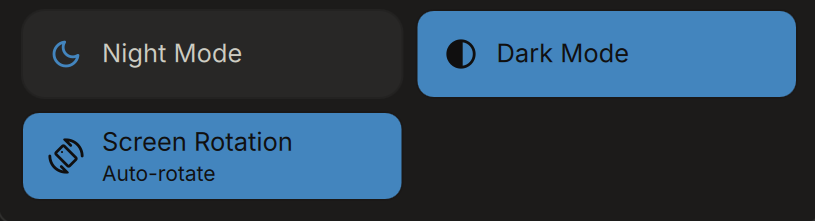
The tile icon follows the state: screen_rotation while auto-rotating, screen_lock_rotation when locked; the labels follow the system language (English / 简体中文).
How it works
A single Rust binary with a poll-based event loop (200ms timeout), integrating these pieces in one thread:
- Internal display detection — at startup, scans sysfs (
/sys/class/drm/card*-*/status) for the built-in display (eDP/DSI/LVDS); exits with an error if none is found - Sensor subscription — connects to iio-sensor-proxy over the system bus and subscribes to
AccelerometerOrientationchanges (with ClaimAccelerometer retry) - Applying the transform — on orientation change, runs
niri msg output <monitor> transform <tr>to rotate the screen - State machine — two modes:
- Auto-rotate: transform driven by the live sensor orientation
- Locked: transform fixed to a persisted value; sensor changes ignored
- State persistence — written to
/var/lib/iio-niri-toggle/state.json, surviving session switches (greetd → user login) - Health check — re-queries the orientation every 30s as a fallback for missed signals
Why it runs as root
The daemon must reach the logged-in user’s niri IPC socket under /run/user/<uid> (a 0700 private directory) to issue commands — only root or the user themselves can do that, and the daemon must start before any user logs in (Before=greetd.service). It therefore runs as root, but the systemd unit ships with a full sandbox (ProtectSystem, PrivateNetwork, capabilities stripped to just CAP_DAC_OVERRIDE/CAP_DAC_READ_SEARCH), scoring 3.1/10 in systemd-analyze security.
Install & uninstall
1
2
3
4
5
6
7
# Install (downloads the latest release, verifies SHA256SUMS, extracts and installs)
curl -LO https://raw.githubusercontent.com/zhangmq/iio-niri-toggle/main/deploy/install-release.sh
bash install-release.sh

# Uninstall (removes the service, binary, state and the DMS widget)
curl -LO https://raw.githubusercontent.com/zhangmq/iio-niri-toggle/main/deploy/uninstall.sh
bash uninstall.sh
Releases are published on GitHub Releases as a tarball (binary, systemd unit, install/uninstall scripts, DMS widget and docs).
References
- GitHub: https://github.com/zhangmq/iio-niri-toggle
- niri
- iio-sensor-proxy
- iio-niri
- DankMaterialShell